




View on Amazon
From the brand

TEEHO
TEEHO door lock, unlock smart life.


TEEHO TE019 Smart Keypad Door Lock with Handle – Matte Black Review
Introduction
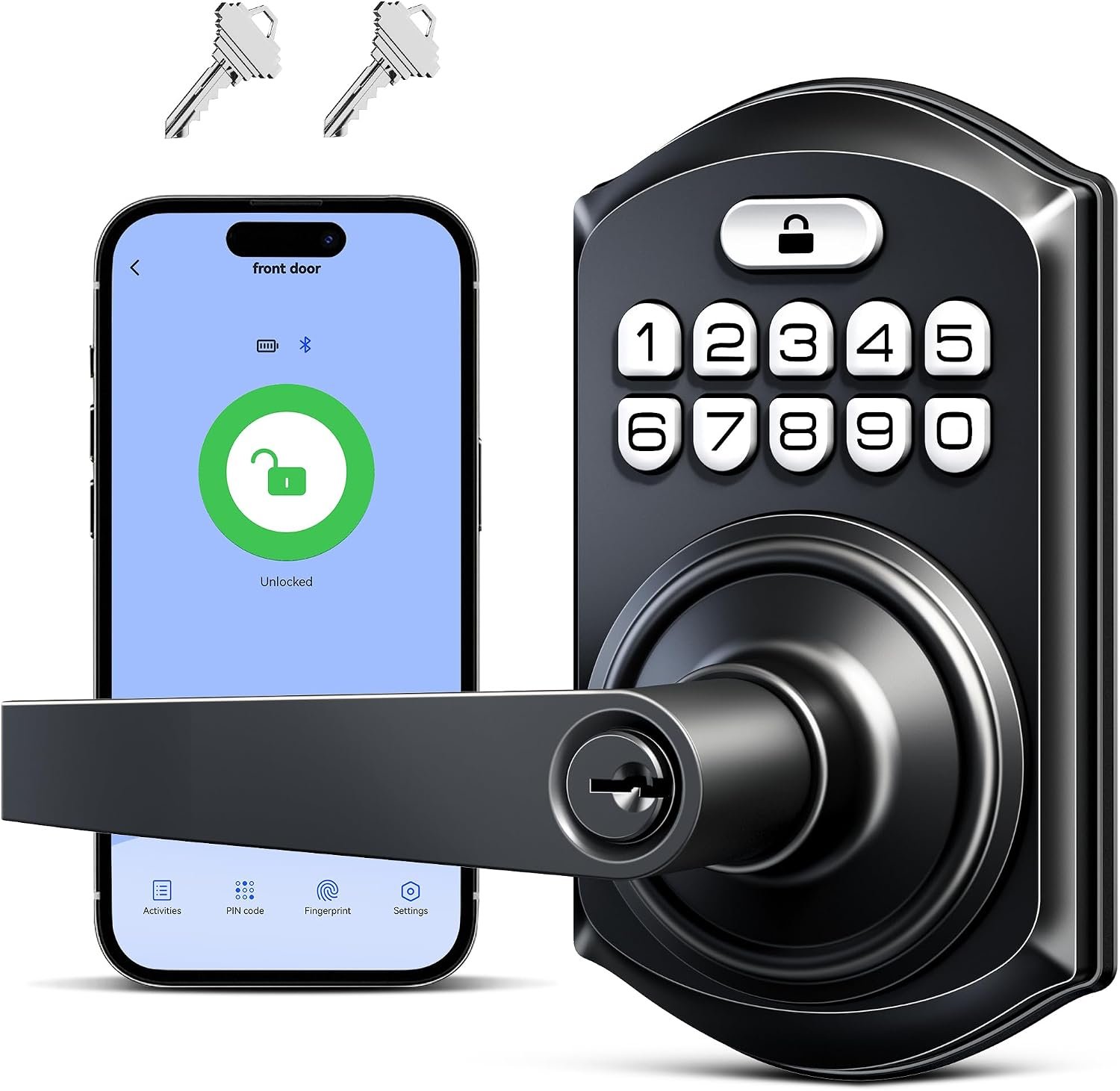
Upgrading a traditional front-door lock to a smart keypad system can make everyday access more convenient while offering greater flexibility for families, guests, and rental property managers. The TEEHO TE019 Smart Keypad Door Lock with Handle combines keyless entry, customizable access codes, automatic locking, and a traditional backup key in a single matte-black design. It is intended for homeowners and renters who want to simplify entry without relying exclusively on physical keys.
One of the most appealing aspects of this model is its combination of smart features and straightforward installation. Users can unlock the door through the KK Home App, enter a personal passcode, or use one of the two included backup keys. The lock also supports temporary access codes and activity tracking through the app, while an optional Wi-Fi gateway adds remote-control features and voice-assistant compatibility.
With ANSI Grade 3 security certification, an advertised IP55 weather-resistance rating, and adjustable installation components, the TE019 offers a practical collection of features for everyday residential use. However, buyers should understand the distinction between Bluetooth connectivity and remote access, as well as the limitations of its security rating, before deciding whether it suits their door and household.
Multiple Ways to Unlock the Door
The TE019 provides four main access options: the KK Home App, custom passcodes, backup keys, and smart-home functions when paired with the separately sold TEEHO G1 Wi-Fi Gateway.
The keypad supports up to 100 custom passcodes, making the lock suitable for households with multiple occupants or properties where access needs to be shared. Each authorized person can have an individual code instead of relying on a single key that may be lost, copied, or passed between users.
This flexibility can be particularly useful for families, cleaners, maintenance workers, and short-term guests. The two backup keys provide another way to enter if electronic access is unavailable, although users should keep them somewhere secure and accessible when needed.
The app adds convenience for managing access, while the gateway expands the available smart features. It is important to note that the lock’s standard Bluetooth functionality does not automatically mean it can be controlled from anywhere over the internet. Remote locking, remote unlocking, compatible voice commands, and associated smart-home features require the appropriate gateway and setup.
For buyers who primarily want a keypad that eliminates the need to carry keys every day, the standard access options may be sufficient. Those who expect full remote management should include the gateway in their purchasing plans.
Temporary Codes and Access History
Access management is one of the TE019’s strongest advertised features. Through the KK Home App, users can create and share temporary codes for visitors, deliveries, cleaners, or maintenance personnel. Depending on the selected settings, codes can be configured for one-time use or a defined period.
Permanent and recurring codes can also be managed through Bluetooth. This arrangement can help property owners organize access without handing out physical keys or constantly changing the main household code.
For rental properties, this functionality may be especially useful. A property manager can arrange access for a guest or service provider and maintain a more organized system for controlling entry. Families can also assign separate codes to household members, making it easier to manage who is authorized to use the lock.
The product description states that the app provides access activity tracking. This can help users review recorded entry events, although the availability and timeliness of records may depend on the connection method and configuration. Buyers should verify exactly which events are recorded and whether remote notifications require the gateway.
As with any electronic access system, passcodes should be shared carefully. Temporary codes should be disabled or allowed to expire when they are no longer needed, and users should avoid choosing predictable combinations such as birthdays or repeated digits.
Automatic Locking and One-Touch Operation
The TE019 includes an adjustable auto-lock feature that can be configured through the app for a delay between 10 and 180 seconds. This gives users some flexibility depending on how they use the door.
For example, a shorter delay may suit a front entrance where security is a priority, while a longer interval may be useful when occupants regularly carry groceries or other items inside. The lock also supports one-touch locking, allowing users to secure the door quickly when leaving.
Another advertised security feature is an alert after ten incorrect PIN attempts. This can help draw attention to repeated unsuccessful keypad entries. However, buyers should check the product instructions to understand precisely how the alert is delivered and whether internet connectivity or the gateway is required for remote notifications.
Automatic locking is convenient, but it should not replace the habit of checking that the door has actually secured properly. Door alignment, latch movement, and installation quality can affect performance. Before relying on auto-lock, users should test the mechanism several times and confirm that the latch engages smoothly.
The lock also offers Passage Mode, which disables automatic locking for situations where frequent entry is expected. This can be helpful in shared spaces or during busy periods, but it should be used thoughtfully because the door may remain unlocked until the mode is disabled or the lock is manually secured.
Security Features and Durable Construction
The TE019 is advertised with an ANSI Grade 3 security certification, an aluminum-alloy keypad, and a zinc-alloy handle. Grade 3 is generally associated with basic residential lock security, rather than the higher levels offered by Grade 1 or Grade 2 hardware. This makes it important to consider the lock’s intended use and the security requirements of the property.
The listing also specifies IP55 weather resistance. This rating indicates protection against limited dust ingress and water jets under defined test conditions; it does not mean the lock is waterproof or suitable for unrestricted exposure to severe weather. Correct installation and following the manufacturer’s maintenance instructions remain important, particularly on doors exposed to rain or direct sunlight.
Additional features include anti-peeping password protection, AES-128 encryption for local data, a backlit keypad, Silent Mode, and Vacation Mode. Anti-peeping functionality is intended to help users enter their code without making the actual combination obvious to someone nearby. The illuminated keypad can also improve usability in dim conditions.
Silent Mode may be useful for households that prefer quieter operation, while Vacation Mode provides an additional setting for periods when the property is unoccupied. The exact behavior of these modes should be confirmed in the instruction manual.
An interior thumb turn allows manual locking and unlocking from inside. This is a familiar and convenient feature that complements the electronic controls, although users should ensure that the internal mechanism operates freely after installation.
Overall, the TE019 provides a useful set of everyday security features, but no electronic lock can compensate for a weak door, an inadequate frame, or poor installation. Buyers should evaluate the complete entryway rather than relying on the lock’s advertised features alone.
Battery Life and Low-Power Alerts
The lock operates on four AA batteries, which are not included. The manufacturer advertises battery life of up to one year under normal use, though actual performance can vary depending on the number of daily lock operations, environmental conditions, and smart features in use.
A low-battery alert through the KK Home App is intended to notify users when the battery level falls below 20%. This is a helpful feature because replacing batteries before they are depleted reduces the risk of unexpected access problems.
For best results, users should check the battery condition periodically and keep compatible replacement batteries available. The backup keys also provide an alternative entry method if electronic operation is interrupted, provided the keys are accessible.
The advertised one-year battery life should be treated as an estimate rather than a guarantee. Households with frequent visitors or rental properties with heavy daily use may experience different results.
Installation and Door Compatibility
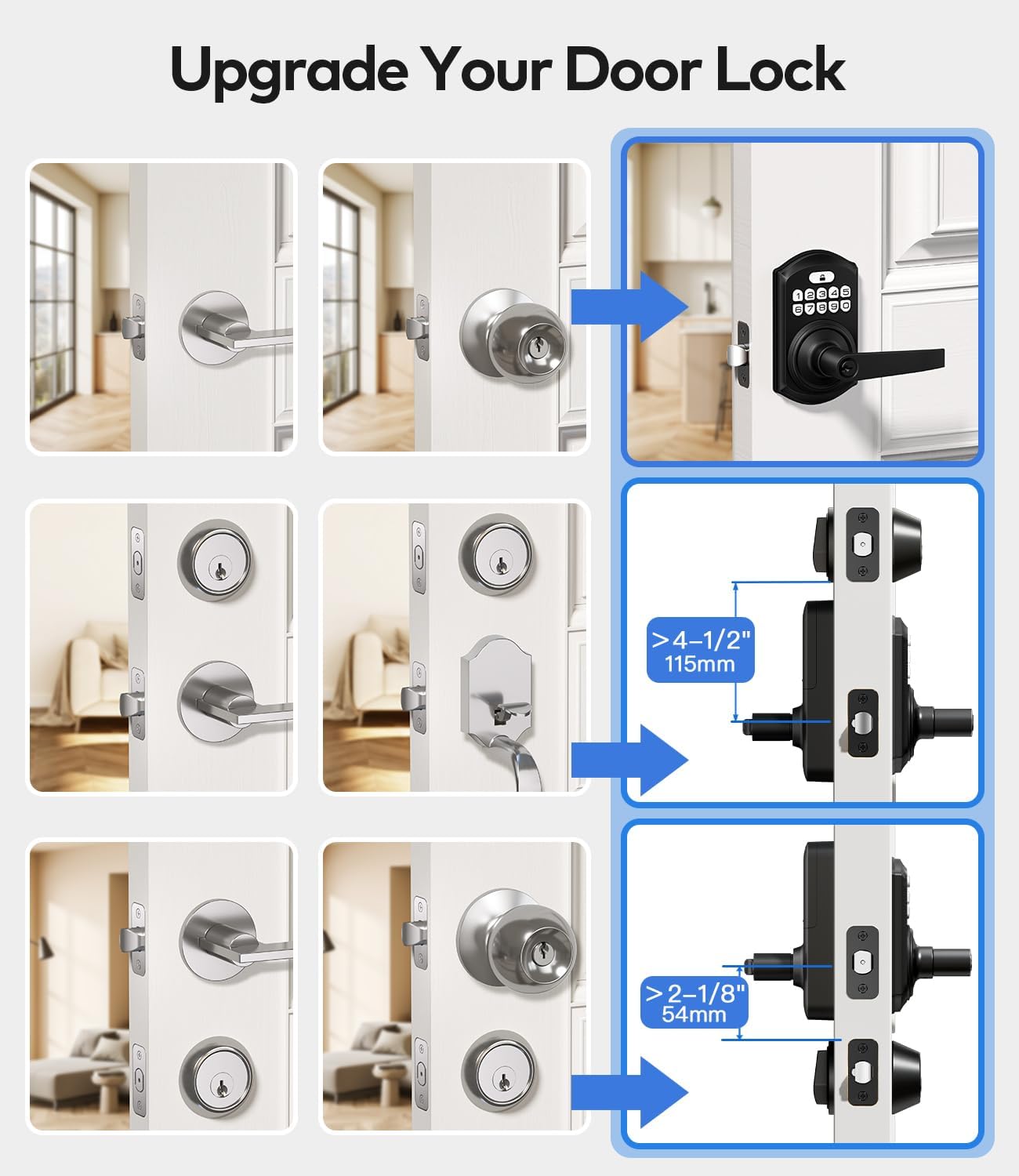
TEEHO states that installation can take approximately ten minutes using a screwdriver. The adjustable latch supports backsets of 2-3/8 inches or 2-3/4 inches, while the lock is designed for doors between 1-3/8 and 2 inches thick. It also specifies a standard 2-1/8-inch bore hole and compatibility with both left- and right-handed doors.
These measurements cover many common residential doors, making the TE019 a potentially convenient upgrade for existing hardware. Nevertheless, buyers should measure their door before ordering instead of assuming that every front door will be compatible.
Installation time will also depend on the condition of the existing holes, the alignment of the latch, and whether the current handle arrangement matches the new hardware. A properly aligned lock should operate without excessive force, and the latch should move smoothly when the door is open and closed.
The matte-black finish gives the lock a modern appearance that can complement contemporary entry doors and other dark hardware. Its integrated handle also provides a coordinated look rather than requiring users to select a separate handle and keypad.
Warranty and Customer Support
The product is advertised with a two-year warranty and lifetime after-sales support. The manufacturer lists 24/7 email assistance and weekday phone support during specified Pacific Time business hours.
These support options can be valuable for an electronic lock, particularly when users need help with setup, app pairing, access-code management, or troubleshooting. However, warranty coverage and lifetime support are not necessarily the same thing. Buyers should review the warranty terms to determine what is covered, whether proof of purchase is required, and how replacement parts or defective units are handled.
Customers outside the manufacturer’s primary service region should also confirm how support and warranty claims are processed in their country.
Final Verdict
The TEEHO TE019 Smart Keypad Door Lock with Handle is a versatile residential lock designed to make everyday access easier without depending entirely on traditional keys. Its support for up to 100 custom passcodes, temporary access codes, app-based management, auto-locking, one-touch locking, and backup keys makes it suitable for many households and rental properties.
The matte-black finish, backlit keypad, adjustable latch, and compatibility with common door dimensions add to its practical appeal. Its battery alerts and optional Wi-Fi gateway also provide useful flexibility for users who want additional smart-home functionality.
There are a few important considerations. ANSI Grade 3 is a basic residential security classification, the IP55 rating does not mean the lock is waterproof, and remote control requires the separately purchased TEEHO G1 gateway. Buyers should also verify door measurements, test the locking mechanism after installation, and maintain the batteries.
Overall, the TEEHO TE019 is worth considering for users seeking convenient keyless entry, flexible code management, and straightforward residential installation. It is particularly appealing for families and rental-property managers who need to share access without distributing physical keys. For buyers who require higher-grade physical security or built-in Wi-Fi without additional hardware, comparing alternatives before purchasing would be sensible.